# Managing Your Program

Once your bug bounty program is live, you can manage it directly from your Catchify portal. The program management page gives you control over your program's scope, rewards, and rules -- while the Catchify team handles researcher management and day-to-day operations.

## Viewing Your Program

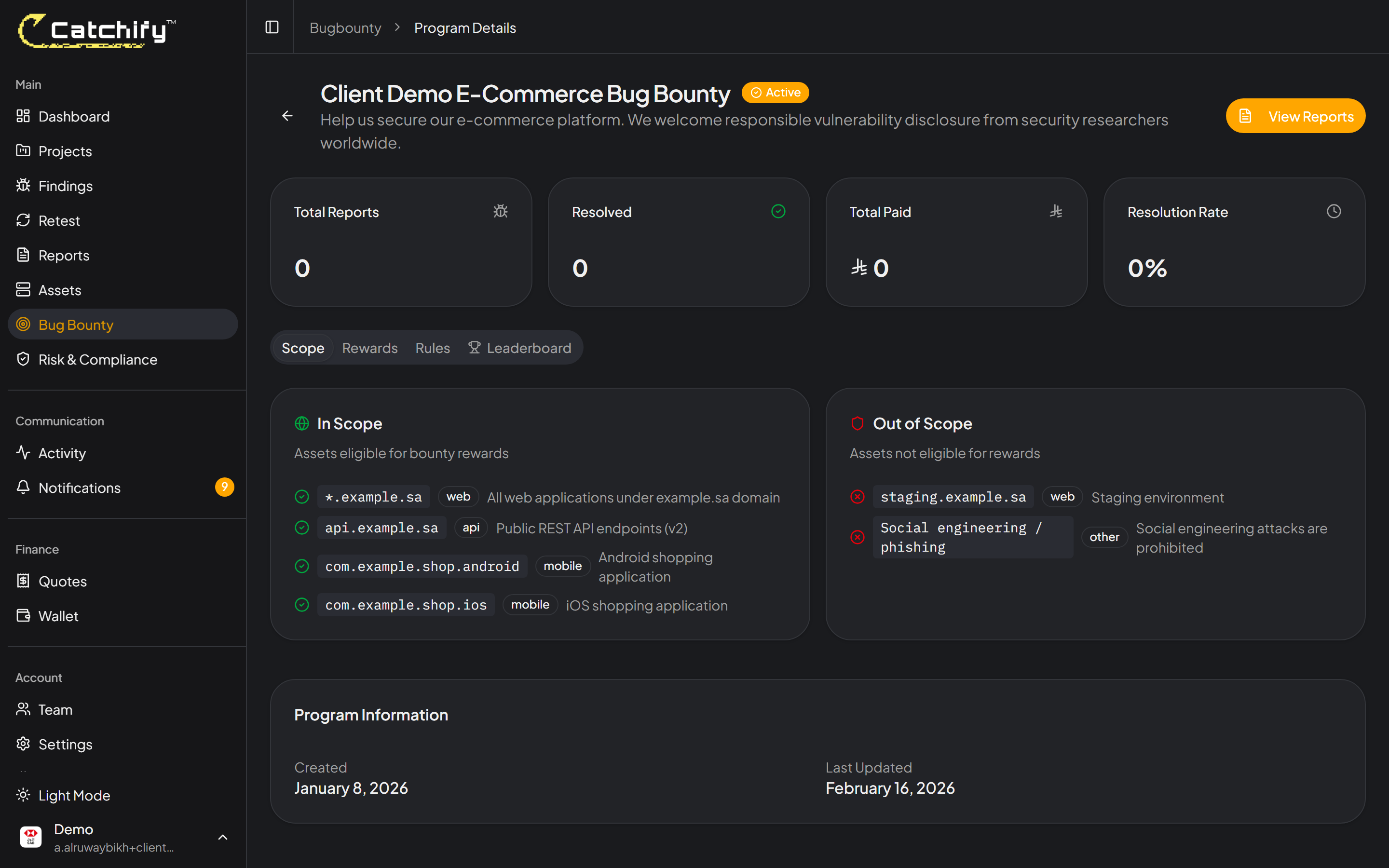
Navigate to **Bug Bounty** in the main menu to see your active programs. Click on a program to view its details and settings.

<figure><img src="https://1934022057-files.gitbook.io/~/files/v0/b/gitbook-x-prod.appspot.com/o/spaces%2FSEbSDqwQ0dOF3yycuHLw%2Fuploads%2Fgit-blob-4353ada1462ed4cc09c07fd420cac840fd57c9e0%2Fbugbounty-program-detail.png?alt=media" alt="Bug bounty program overview page showing status, scope, and reward table"><figcaption><p>Your bug bounty program overview -- scope, rewards, and current status at a glance</p></figcaption></figure>

## Program Settings

Your program page shows the key configuration that defines how the program operates:

### Scope

The scope defines exactly what researchers are allowed to test. It includes:

* **In-scope targets** -- The specific domains, applications, or systems researchers can test
* **Out-of-scope items** -- Targets or vulnerability types that researchers should not test or report
* **Testing rules** -- Guidelines researchers must follow, such as not accessing customer data or not performing denial-of-service testing

{% hint style="info" %}
The Catchify team helps you define your initial scope during program setup. If you need to update it later -- for example, to add a new application or exclude a system undergoing maintenance -- contact your account manager.
{% endhint %}

### Reward Table

Your reward table defines how much researchers earn for valid findings at each severity level:

| Severity     | Typical Reward Range     |
| ------------ | ------------------------ |
| **Critical** | SAR 5,000 -- SAR 25,000+ |
| **High**     | SAR 2,000 -- SAR 10,000  |
| **Medium**   | SAR 500 -- SAR 3,000     |
| **Low**      | SAR 100 -- SAR 500       |

The actual amounts for your program are set during setup. Competitive rewards attract more skilled researchers, which means better coverage for your applications.

<figure><img src="https://1934022057-files.gitbook.io/~/files/v0/b/gitbook-x-prod.appspot.com/o/spaces%2FSEbSDqwQ0dOF3yycuHLw%2Fuploads%2Fgit-blob-4353ada1462ed4cc09c07fd420cac840fd57c9e0%2Fbugbounty-program-detail.png?alt=media" alt="Reward table showing amounts for each severity level"><figcaption><p>Your reward table -- researchers see these amounts when they view your program</p></figcaption></figure>

### Program Rules

Program rules set expectations for how researchers should behave. Common rules include:

* Do not access, modify, or delete data belonging to other users
* Do not perform testing that could degrade service performance
* Report vulnerabilities promptly and do not disclose them publicly
* Only test within the defined scope

## Program Statuses

Your program can be in one of these states:

| Status     | Meaning                                                                                                                    |
| ---------- | -------------------------------------------------------------------------------------------------------------------------- |
| **Active** | The program is live and researchers can submit reports                                                                     |
| **Paused** | The program is temporarily halted -- researchers cannot submit new reports, but existing reports are still being processed |
| **Draft**  | The program is being set up and is not yet visible to researchers                                                          |

{% hint style="warning" %}
If you need to pause your program -- for example, during a major deployment or migration -- contact the Catchify team. They will pause the program and notify active researchers.
{% endhint %}

## Program Statistics

Your program page includes key metrics to help you track performance:

* **Total reports received** -- How many reports have been submitted by researchers
* **Valid reports** -- Reports that were confirmed as real vulnerabilities
* **Total rewards paid** -- The cumulative amount paid to researchers
* **Average response time** -- How quickly reports are triaged and responded to

<figure><img src="https://1934022057-files.gitbook.io/~/files/v0/b/gitbook-x-prod.appspot.com/o/spaces%2FSEbSDqwQ0dOF3yycuHLw%2Fuploads%2Fgit-blob-4353ada1462ed4cc09c07fd420cac840fd57c9e0%2Fbugbounty-program-detail.png?alt=media" alt="Program statistics showing report counts, rewards paid, and response times"><figcaption><p>Track your program's performance with real-time statistics</p></figcaption></figure>

## Working with the Catchify Team

While you have visibility into your program through the portal, the Catchify team handles many operational tasks behind the scenes:

* **Researcher invitations** -- The Catchify team selects and invites qualified researchers to your program based on their skills and track record
* **Initial triage** -- Every report is reviewed by the Catchify triage team before it reaches you
* **Researcher communication** -- Routine questions from researchers are handled by the Catchify team
* **Scope clarifications** -- If a researcher has questions about what is in scope, the Catchify team provides guidance based on your program rules

{% hint style="success" %}
Think of the Catchify team as an extension of your security organization. You set the direction, and we handle the execution.
{% endhint %}
