> For the complete documentation index, see [llms.txt](https://docs.catchify.sa/llms.txt). Markdown versions of documentation pages are available by appending `.md` to page URLs; this page is available as [Markdown](https://docs.catchify.sa/catchify-platform-documentation/bug-bounty-program/reviewing-reports.md).
# Reviewing Reports
When a security researcher discovers a vulnerability in your application through the bug bounty program, they submit a report through Catchify. The Catchify triage team reviews every report first, and only validated submissions reach your queue for review. This page explains how to review and manage those reports.
## How Reports Reach You
Before a report appears in your portal, it goes through Catchify's triage process:
1. **Researcher submits a report** -- A researcher identifies a vulnerability and submits detailed documentation
2. **Catchify triage review** -- Our security team validates the report, confirming it is legitimate, in scope, and not a duplicate
3. **Report appears in your portal** -- Only confirmed, valid reports are forwarded to you for review
4. **You review and respond** -- You review the finding and approve or provide feedback
{% hint style="info" %}
The Catchify triage team filters out duplicates, false positives, and out-of-scope reports so you only spend time on issues that matter.
{% endhint %}
## Viewing Your Reports
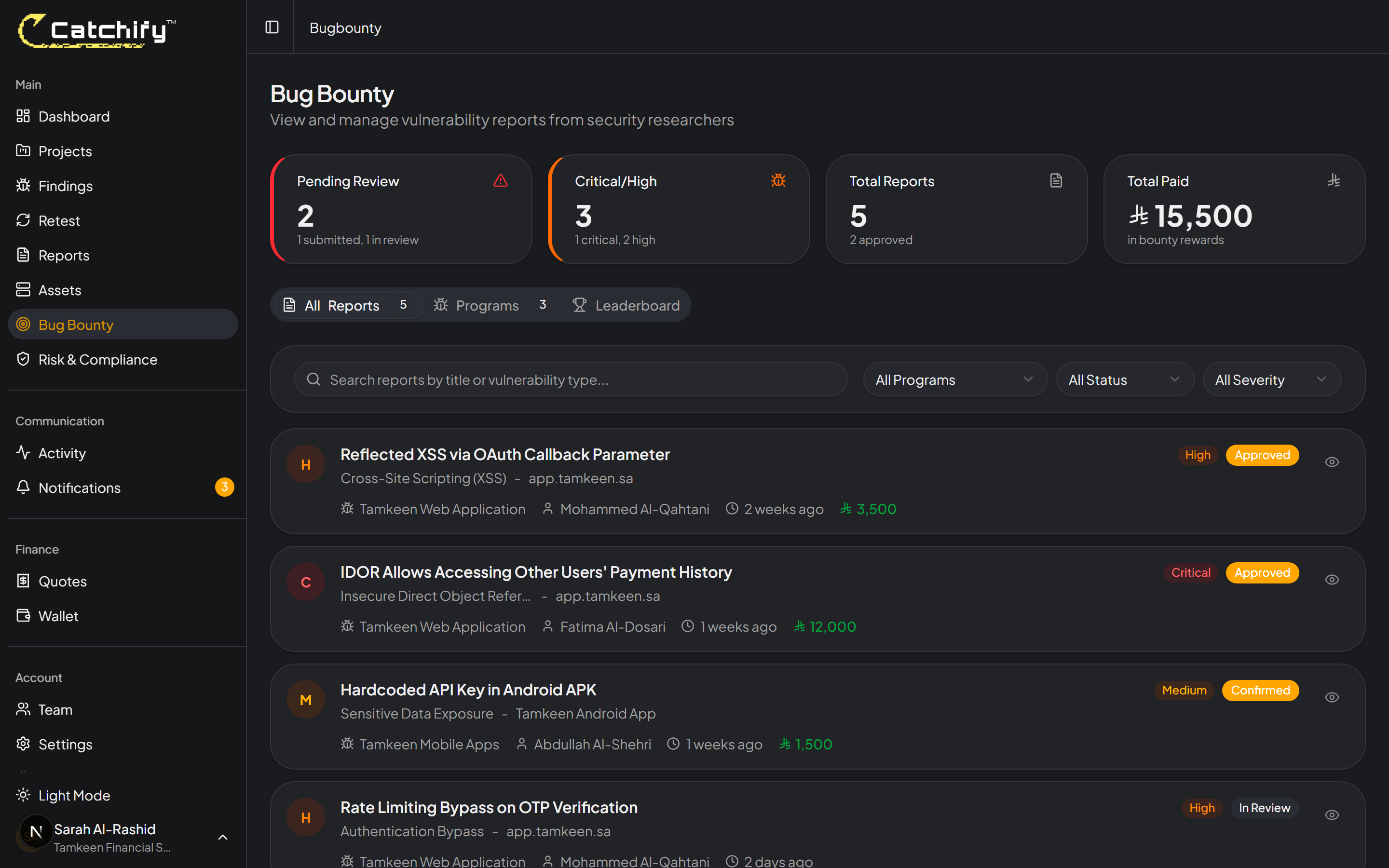
Navigate to **Bug Bounty** and then **Reports** to see all submissions for your programs. Each report shows:
* **Title** -- A summary of the vulnerability
* **Severity** -- The assessed severity level
* **Status** -- Where the report is in the review process
* **Researcher** -- The username of the researcher who submitted it (researchers remain anonymous by default)
* **Submitted date** -- When the report was received
Your bug bounty reports -- review validated submissions from security researchers
## Report Statuses
Each report moves through the following stages:
| Status | What It Means |
| ------------- | -------------------------------------------------------------------------- |
| **New** | The report has been submitted and is awaiting initial triage |
| **Triaged** | The Catchify team has validated the report and it is ready for your review |
| **Confirmed** | You have confirmed that the vulnerability is valid and will be addressed |
| **Approved** | The report has been approved for reward payment |
| **Rejected** | The report was determined to not be a valid finding (with explanation) |
| **Duplicate** | The same vulnerability was already reported by another researcher |
| **Resolved** | The vulnerability has been fixed and verified |
The typical flow for a valid report is: **New** --> **Triaged** --> **Confirmed** --> **Approved** --> **Resolved**
## Reviewing a Report
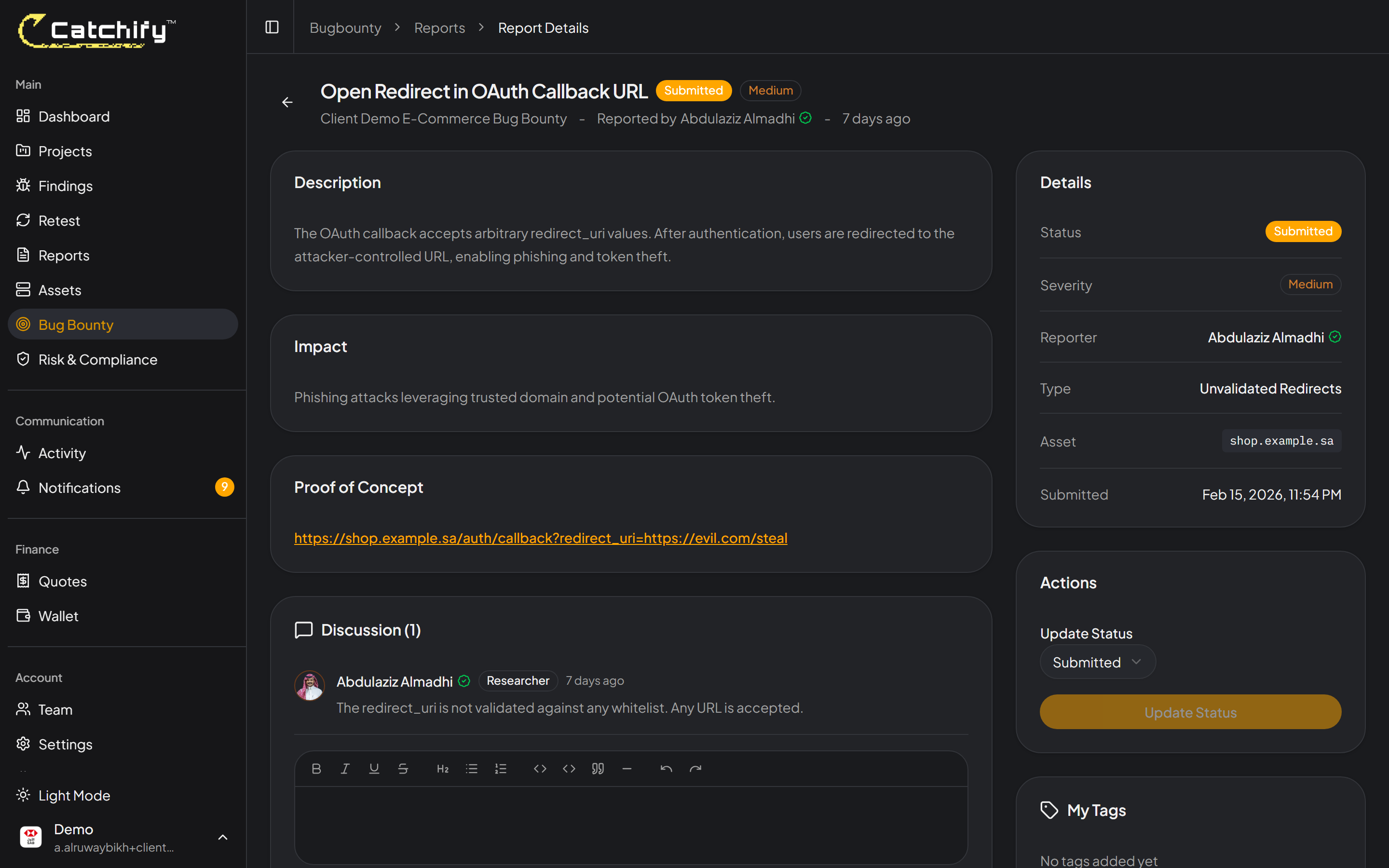
When you open a report, you will see the full details submitted by the researcher:
* **Vulnerability description** -- What the issue is and how it was found
* **Impact assessment** -- What an attacker could do by exploiting this vulnerability
* **Steps to reproduce** -- How to demonstrate the vulnerability
* **Evidence** -- Screenshots, recordings, or other proof
* **Suggested severity** -- The researcher's proposed severity (the Catchify team may adjust this during triage)
A report includes everything you need to understand the vulnerability
## Taking Action on a Report
After reviewing a report, you can:
### Confirm the Finding
If you agree the vulnerability is valid, change the status to **Confirmed**. This signals to the Catchify team that you acknowledge the issue and will work on a fix.
### Add Comments
Add comments to communicate with the Catchify team about the report. For example:
* Ask for clarification about the reproduction steps
* Provide context about why a finding may be less severe in your environment
* Share an estimated timeline for a fix
### Approve for Reward
When you are satisfied that the report is valid and complete, change the status to **Approved**. The Catchify team will process the researcher's reward from your bug bounty wallet.
### Reject
If you believe the report is not valid or not applicable, you can reject it. Provide a clear explanation so the Catchify team can communicate the reasoning to the researcher.
{% hint style="warning" %}
Prompt responses to reports maintain researcher motivation and program reputation. We recommend reviewing new reports within 48 hours of them being triaged.
{% endhint %}
## After Approval
Once a report is approved:
* The researcher receives their reward through the Catchify wallet system
* The finding is added to your project's finding list
* You can track the fix and request a retest, just like any other finding
* The report status changes to **Resolved** once the fix is verified
{% hint style="success" %}
Consistent, timely reviews encourage researchers to continue testing your applications. A well-managed bug bounty program attracts the best talent.
{% endhint %}
---
# Agent Instructions
This documentation is published with GitBook. GitBook is the documentation platform designed so that both humans and AI agents can read, navigate, and reason over technical content effectively. Learn more at gitbook.com.
## Querying This Documentation
If you need additional information that is not directly available in this page, you can query the documentation dynamically by asking a question.
Perform an HTTP GET request on the current page URL with the `ask` query parameter, and the optional `goal` query parameter:
```
GET https://docs.catchify.sa/catchify-platform-documentation/bug-bounty-program/reviewing-reports.md?ask=&goal=
```
`ask` is the immediate question: it should be specific, self-contained, and written in natural language.
`goal` is optional and describes the broader end goal you are ultimately trying to accomplish on behalf of the user. GitBook uses it to tailor the answer towards what is most useful for that goal.
The response will contain a direct answer to the question and relevant excerpts and sources from the documentation.
Use this mechanism when the answer is not explicitly present in the current page, you need clarification or additional context, or you want to retrieve related documentation sections.