> For the complete documentation index, see [llms.txt](https://docs.catchify.sa/llms.txt). Markdown versions of documentation pages are available by appending `.md` to page URLs; this page is available as [Markdown](https://docs.catchify.sa/catchify-platform-documentation/bug-bounty-program/rewards-and-payments.md).
# Rewards & Payments
When a security researcher submits a valid vulnerability report through your bug bounty program, they earn a reward. The Catchify platform manages the entire payment process for you -- from setting reward levels to distributing payments to researchers.
## How Rewards Work
Rewards are paid to researchers based on the severity of their verified findings. When you approve a bug bounty report, the corresponding reward amount is deducted from your bug bounty wallet and paid to the researcher through Catchify.
You set the reward amounts for each severity level when your program is created, and you can adjust them over time with help from the Catchify team.
### Typical Reward Ranges
| Severity | Typical Range (SAR) | Description |
| ------------ | ------------------- | ------------------------------------------------ |
| **Critical** | 5,000 -- 25,000+ | Vulnerabilities with the highest business impact |
| **High** | 2,000 -- 10,000 | Significant security risks |
| **Medium** | 500 -- 3,000 | Moderate issues that should be addressed |
| **Low** | 100 -- 500 | Minor issues with limited impact |
{% hint style="info" %}
The actual reward amounts for your program depend on the type and sensitivity of your applications. The Catchify team will recommend appropriate levels based on industry benchmarks and your budget.
{% endhint %}
## The Payment Process
Here is what happens from the time a report is approved to when the researcher gets paid:
1. **You approve the report** -- You confirm the vulnerability is valid and approve the reward
2. **Amount deducted from wallet** -- The reward amount is automatically deducted from your bug bounty wallet
3. **Catchify processes payment** -- The Catchify team handles the transfer to the researcher
4. **Researcher receives payment** -- The researcher is paid through the platform
You do not need to handle any payment logistics -- no invoicing individual researchers, no bank transfers, and no payment tracking. Catchify manages everything.
## Your Bug Bounty Wallet
Your bug bounty wallet is a prepaid balance that funds researcher rewards. You add credits to your wallet, and rewards are deducted automatically when reports are approved.
### Adding Credits
To add credits to your wallet:
1. Navigate to **Wallet** in the main menu
2. Click **Add Credits**
3. Enter the amount you would like to add
4. The Catchify team will generate an invoice for the credit amount
5. Once payment is received, credits are added to your wallet
### Viewing Your Balance
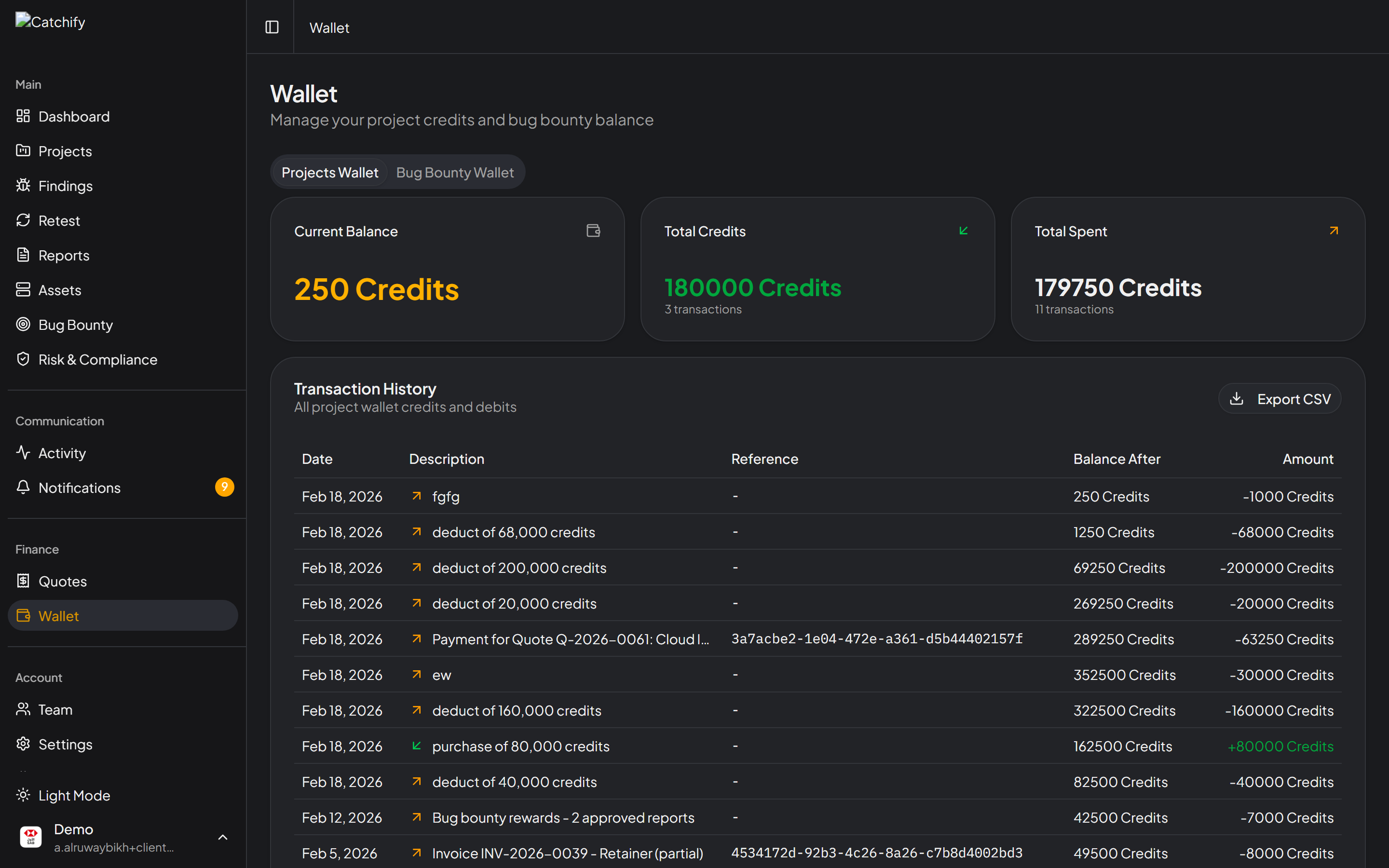
Your current wallet balance is displayed on the Wallet page. You can also see:
* **Available balance** -- How much is available for future rewards
* **Pending rewards** -- Amounts reserved for reports that are confirmed but not yet paid
* **Total spent** -- Cumulative rewards paid since the program started
Your wallet balance and recent transactions
{% hint style="warning" %}
Keep your wallet funded to ensure researchers can be paid promptly. If your wallet balance is too low to cover a reward, the payment will be held until credits are added. This can slow down report resolution and reduce researcher engagement.
{% endhint %}
## Transaction History
The wallet page includes a complete transaction history showing:
* Date of each transaction
* Transaction type (credit added, reward paid)
* Amount
* Related report (for reward payments)
* Running balance
This gives you full visibility into how your bug bounty budget is being spent.
## Setting Competitive Rewards
The Catchify team can help you set reward levels that are competitive and aligned with your budget. Key considerations include:
* **Application sensitivity** -- Applications handling financial or personal data typically warrant higher rewards
* **Market benchmarks** -- Rewards should be competitive with similar programs in your industry
* **Budget allocation** -- Work with your account manager to plan monthly or quarterly budgets
* **Researcher quality** -- Higher rewards attract more experienced researchers
{% hint style="success" %}
Investing in competitive rewards pays off. Organizations with well-funded programs consistently receive higher-quality reports and faster vulnerability discovery.
{% endhint %}
## Need to Adjust Your Rewards?
If you want to change your reward amounts -- for example, to increase rewards during a product launch or focus researchers on a specific application -- contact your account manager. The Catchify team will update your program settings and communicate changes to active researchers.
---
# Agent Instructions
This documentation is published with GitBook. GitBook is the documentation platform designed so that both humans and AI agents can read, navigate, and reason over technical content effectively. Learn more at gitbook.com.
## Querying This Documentation
If you need additional information that is not directly available in this page, you can query the documentation dynamically by asking a question.
Perform an HTTP GET request on the current page URL with the `ask` query parameter, and the optional `goal` query parameter:
```
GET https://docs.catchify.sa/catchify-platform-documentation/bug-bounty-program/rewards-and-payments.md?ask=&goal=
```
`ask` is the immediate question: it should be specific, self-contained, and written in natural language.
`goal` is optional and describes the broader end goal you are ultimately trying to accomplish on behalf of the user. GitBook uses it to tailor the answer towards what is most useful for that goal.
The response will contain a direct answer to the question and relevant excerpts and sources from the documentation.
Use this mechanism when the answer is not explicitly present in the current page, you need clarification or additional context, or you want to retrieve related documentation sections.