> For the complete documentation index, see [llms.txt](https://docs.catchify.sa/llms.txt). Markdown versions of documentation pages are available by appending `.md` to page URLs; this page is available as [Markdown](https://docs.catchify.sa/catchify-platform-documentation/penetration-testing/understanding-findings.md).
# Understanding Findings
A finding is a security vulnerability or weakness that our researchers have discovered during testing. Every finding is documented with enough detail for your development team to understand the issue and fix it. This page explains how findings work and how to manage them in the portal.
## What a Finding Contains
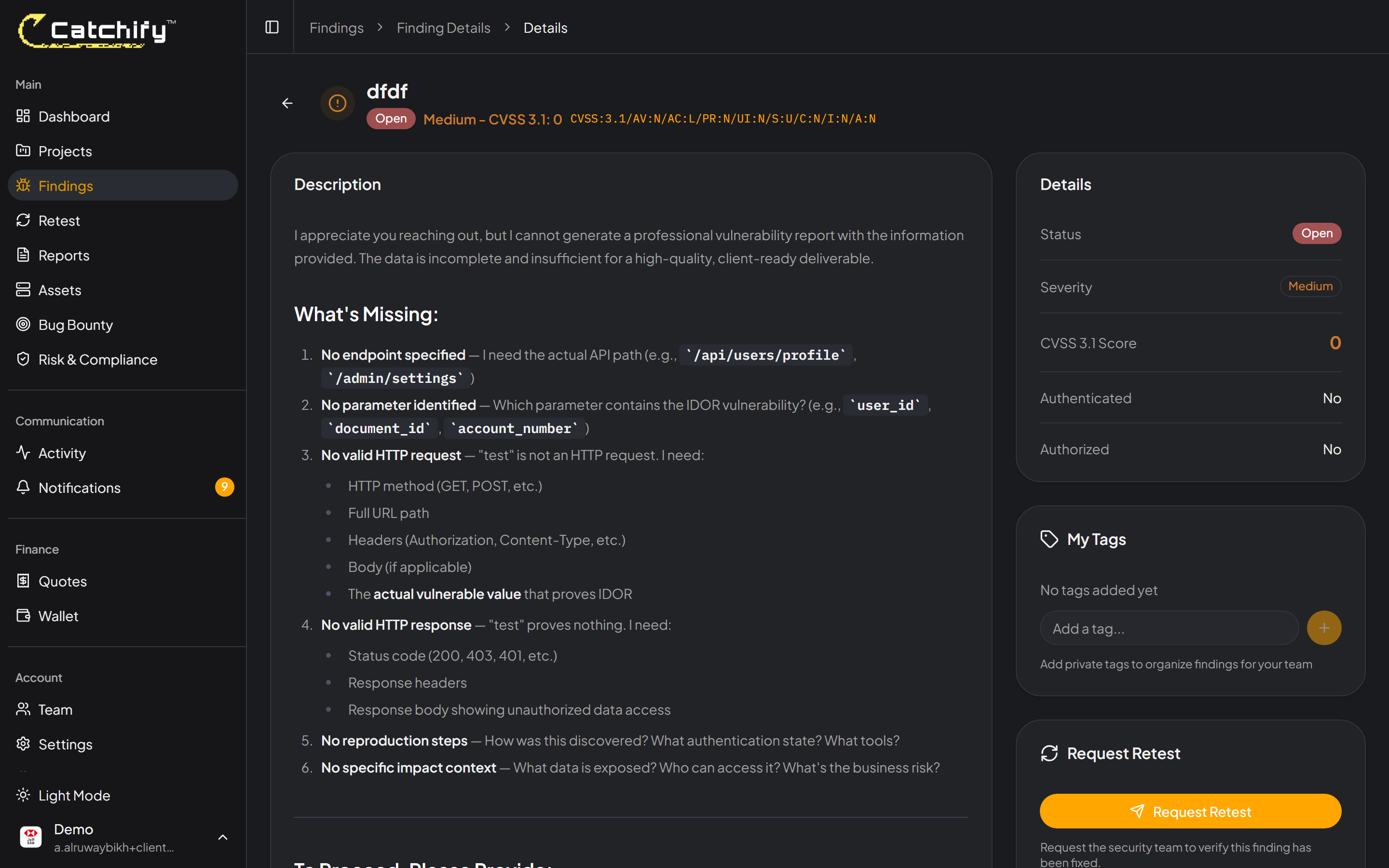
When you open a finding, you will see the following information:
* **Title** -- A clear, descriptive name for the vulnerability
* **Severity** -- How serious the issue is (Critical, High, Medium, Low, or Informational). See [Severity Levels Explained](/catchify-platform-documentation/penetration-testing/severity-levels.md) for details.
* **Status** -- Where the finding is in the resolution process
* **Description** -- A detailed explanation of what the vulnerability is and why it matters
* **Impact** -- What could happen if the vulnerability were exploited by an attacker
* **Steps to reproduce** -- A clear walkthrough showing how the issue can be demonstrated
* **Evidence** -- Screenshots, request/response samples, or other proof that the vulnerability exists
* **Recommendation** -- Guidance on how to fix the issue
* **Affected asset** -- Which application, URL, or system is affected
A finding detail page -- everything you need to understand and fix the issue
## Finding Statuses
Each finding moves through a defined workflow as your team addresses it:
| Status | What It Means |
| ----------------- | ------------------------------------------------------------------------------------- |
| **Open** | The finding has been identified and is waiting to be addressed by your team |
| **In Progress** | Your team is actively working on a fix |
| **Fixed** | Your team has applied a fix and the finding is ready for verification |
| **Verified** | The Catchify team has confirmed that the fix resolves the issue |
| **Accepted Risk** | Your organization has acknowledged the finding but decided not to fix it at this time |
The typical flow is: **Open** --> **In Progress** --> **Fixed** --> **Verified**
{% hint style="info" %}
When you mark a finding as Fixed, you can request a retest so the Catchify team can verify the fix. See [Requesting a Retest](/catchify-platform-documentation/penetration-testing/requesting-retest.md) for more details.
{% endhint %}
## Browsing Your Findings
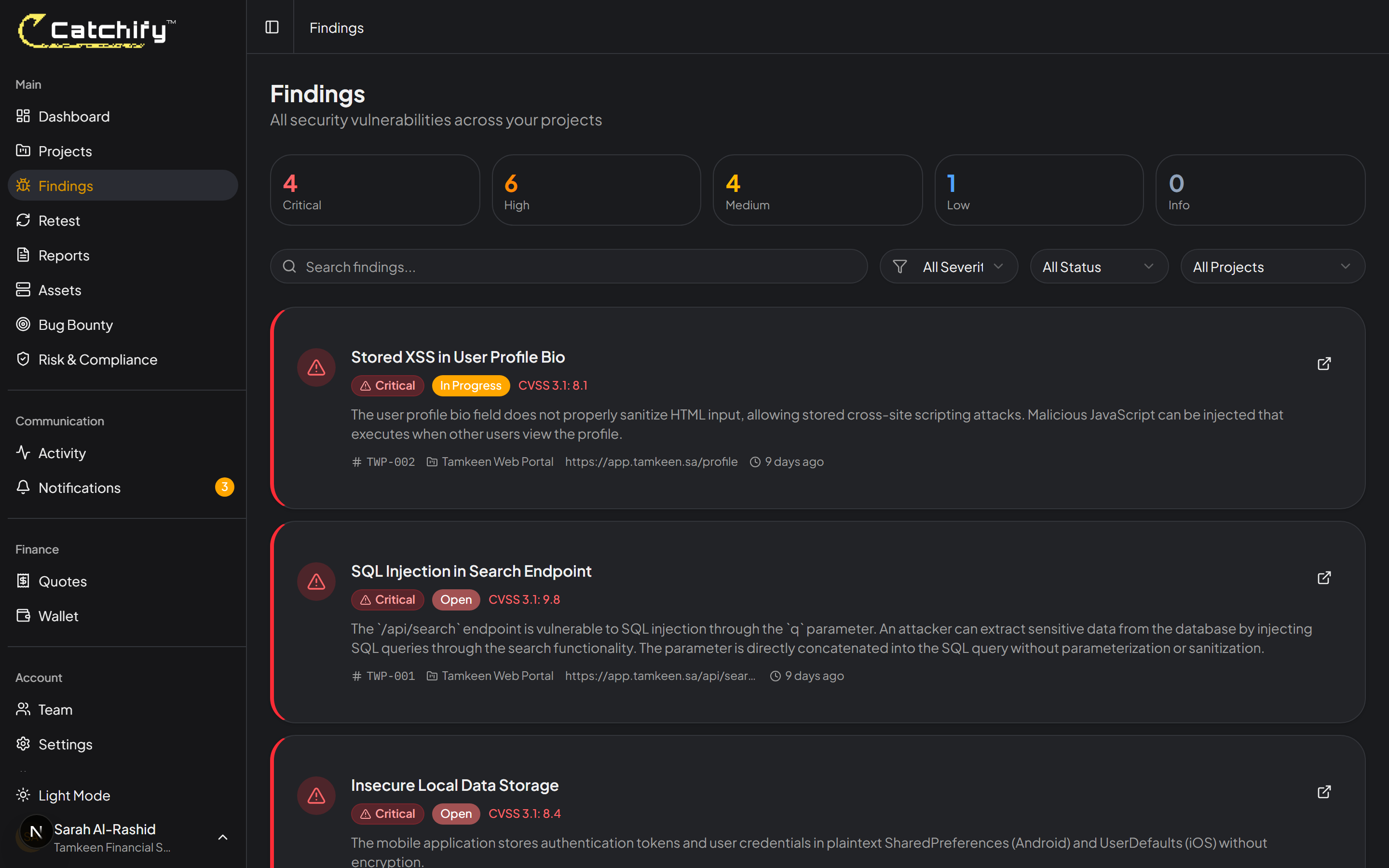
The Findings page gives you a complete list of all vulnerabilities across your projects. You can use filters to narrow down what you see:
* **By severity** -- Focus on critical and high findings first
* **By status** -- See only open findings, or review what has been verified
* **By project** -- View findings for a specific engagement
* **Search** -- Find specific findings by keyword
Filter and search your findings to focus on what matters most
## Adding Comments
You can add comments to any finding to communicate with your team or the Catchify team. Comments are useful for:
* Asking questions about a finding
* Providing context about your environment
* Noting progress on a fix
* Requesting clarification on the recommendation
To add a comment, open the finding and scroll to the **Comments** section at the bottom of the page. Type your message and click **Add Comment**.
## Exporting Findings
You can download your findings in multiple formats for sharing with your team:
* **PDF report** -- A formatted document suitable for management review
* **CSV export** -- A spreadsheet format for tracking and analysis
{% hint style="success" %}
We recommend reviewing new findings within 48 hours of them being reported. The sooner your team starts working on fixes, the shorter your window of exposure.
{% endhint %}
## Working with Your Development Team
Findings are written to be actionable. Share them directly with your developers by:
* Sending them a link to the finding in the portal (if they have access)
* Exporting findings and assigning them in your issue tracker
* Using the [Jira integration](/catchify-platform-documentation/integrations/jira.md) to automatically create tickets from findings
The combination of detailed descriptions, reproduction steps, and remediation guidance gives your development team everything they need to resolve the issue.
---
# Agent Instructions
This documentation is published with GitBook. GitBook is the documentation platform designed so that both humans and AI agents can read, navigate, and reason over technical content effectively. Learn more at gitbook.com.
## Querying This Documentation
If you need additional information that is not directly available in this page, you can query the documentation dynamically by asking a question.
Perform an HTTP GET request on the current page URL with the `ask` query parameter, and the optional `goal` query parameter:
```
GET https://docs.catchify.sa/catchify-platform-documentation/penetration-testing/understanding-findings.md?ask=&goal=
```
`ask` is the immediate question: it should be specific, self-contained, and written in natural language.
`goal` is optional and describes the broader end goal you are ultimately trying to accomplish on behalf of the user. GitBook uses it to tailor the answer towards what is most useful for that goal.
The response will contain a direct answer to the question and relevant excerpts and sources from the documentation.
Use this mechanism when the answer is not explicitly present in the current page, you need clarification or additional context, or you want to retrieve related documentation sections.