> For the complete documentation index, see [llms.txt](https://docs.catchify.sa/llms.txt). Markdown versions of documentation pages are available by appending `.md` to page URLs; this page is available as [Markdown](https://docs.catchify.sa/catchify-platform-documentation/penetration-testing/your-projects.md).
# Your Projects
The Projects page shows all of your penetration testing engagements with Catchify. Each project represents a testing engagement for a specific application, network, or system -- giving you a clear view of what has been tested, what is in progress, and what is coming up.
## Viewing Your Projects
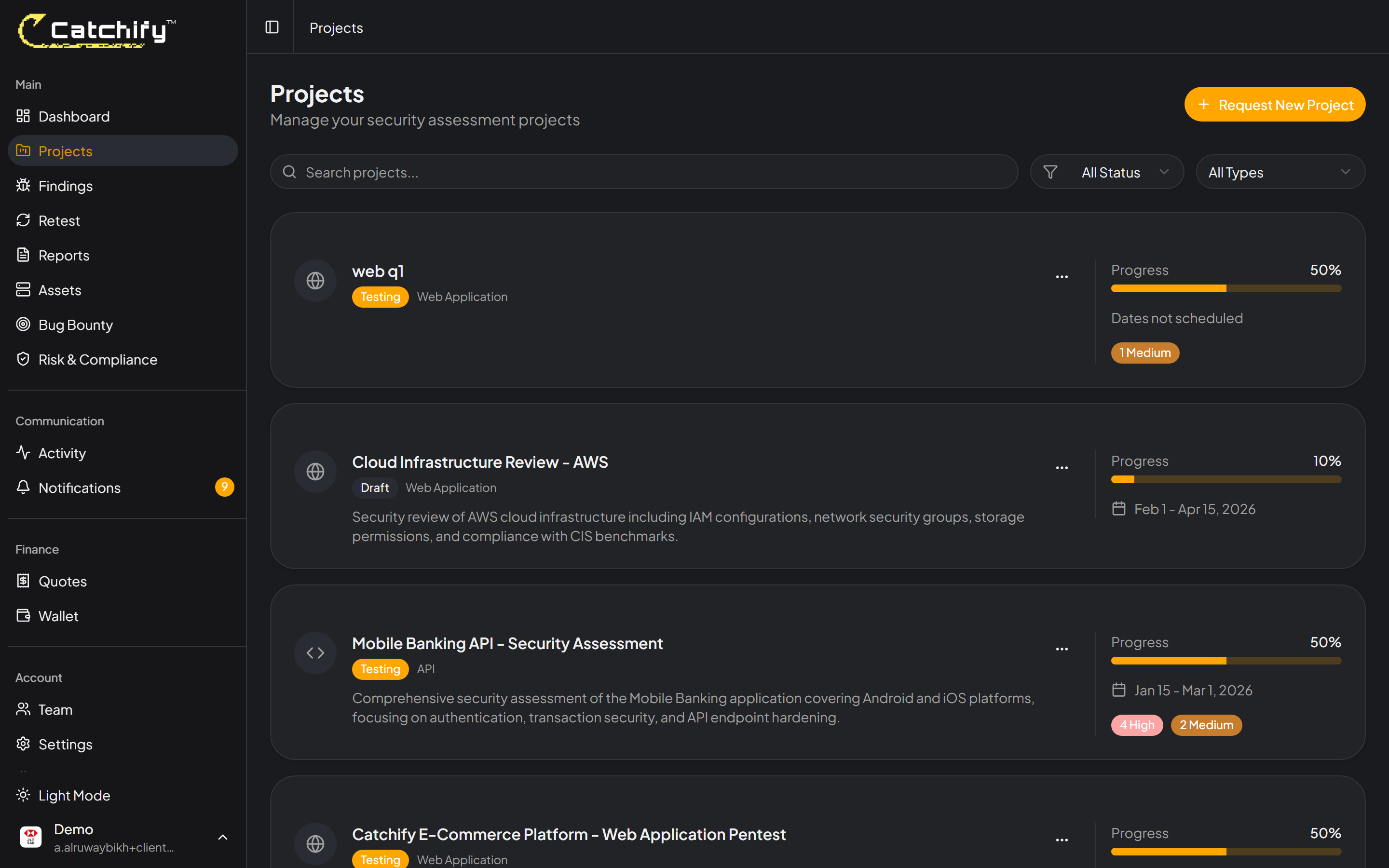
Navigate to **Projects** in the main menu to see a list of all your penetration testing engagements. Each project card shows key information at a glance:
* **Project name** -- The name of the application or system being tested
* **Status** -- Whether the project is pending, active, or completed
* **Start and end dates** -- The testing window for the engagement
* **Finding count** -- How many vulnerabilities have been discovered so far
Your projects page -- see all engagements at a glance
## Project Statuses
Each project goes through a defined lifecycle:
| Status | What It Means |
| ------------- | ------------------------------------------------------------------------------------------------------------------- |
| **Pending** | The project has been set up and is waiting for testing to begin. The Catchify team is preparing for the engagement. |
| **Active** | Our security researchers are currently testing your application. Findings will appear as they are discovered. |
| **Completed** | Testing is finished. The final report is available for download, and all findings have been documented. |
{% hint style="info" %}
During an active engagement, you may see new findings appearing in real time. You do not need to wait for the final report to start reviewing and addressing issues.
{% endhint %}
## Project Details
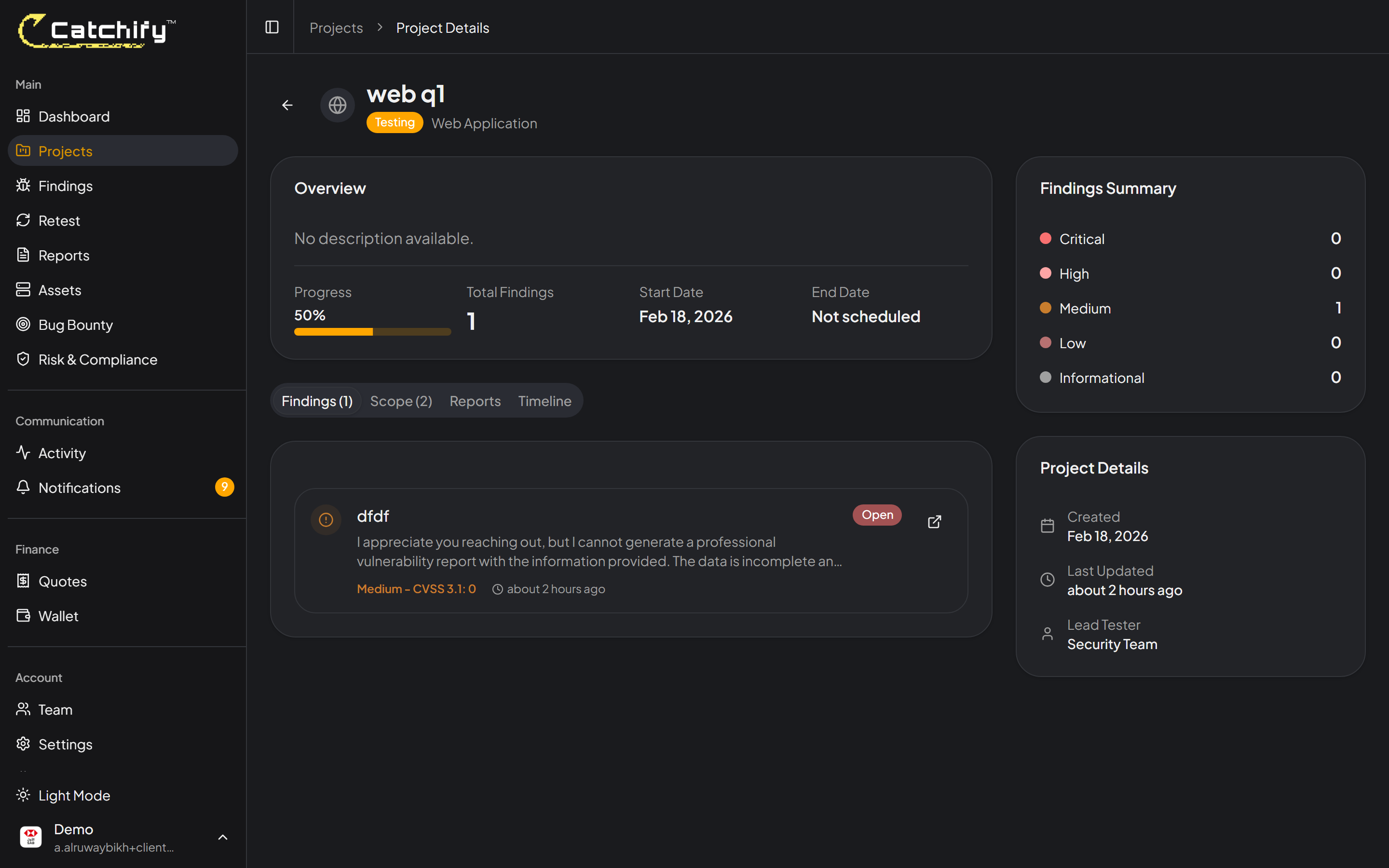
Click on any project to view its full details. The project detail page includes:
### Overview Tab
A summary of the engagement including:
* The scope of testing (which applications, URLs, or systems are being tested)
* The type of testing (web application, mobile, network, cloud)
* The assigned testing team
* Key dates and milestones
The project overview gives you all the key details of the engagement
### Findings Tab
A list of all vulnerabilities discovered during testing. You can:
* Filter findings by severity (Critical, High, Medium, Low, Informational)
* Filter by status (Open, In Progress, Fixed, Verified)
* Search for specific findings by title or description
* Click any finding to see its full details
### Assets Tab
A list of the assets (applications, domains, IP addresses) included in the project scope. This helps you confirm exactly what is being tested.
View and filter all findings for a specific project
## What to Expect During a Project
Here is what a typical penetration testing engagement looks like from your perspective:
1. **Kickoff** -- The Catchify team will confirm the scope and timeline with you. You may need to provide access credentials or whitelist our testing IP addresses.
2. **Active testing** -- Our security researchers begin testing. You may start seeing findings appear within the first few days.
3. **Findings review** -- As findings come in, you can review them, ask questions by adding comments, and start working on fixes.
4. **Final report** -- Once testing is complete, the Catchify team will deliver a comprehensive report with an executive summary, detailed findings, and remediation recommendations.
5. **Retest** -- After you have fixed the identified issues, you can request a retest to verify the fixes.
{% hint style="success" %}
You do not need to wait until the engagement is over to start fixing issues. Addressing critical and high findings early helps reduce your risk exposure faster.
{% endhint %}
## Need a New Project?
If you would like to schedule a new penetration test, contact your account manager or [request a quote](/catchify-platform-documentation/quotes-and-invoices/requesting-a-quote.md) through the portal. The Catchify team will work with you to define the scope and timeline.
---
# Agent Instructions
This documentation is published with GitBook. GitBook is the documentation platform designed so that both humans and AI agents can read, navigate, and reason over technical content effectively. Learn more at gitbook.com.
## Querying This Documentation
If you need additional information that is not directly available in this page, you can query the documentation dynamically by asking a question.
Perform an HTTP GET request on the current page URL with the `ask` query parameter, and the optional `goal` query parameter:
```
GET https://docs.catchify.sa/catchify-platform-documentation/penetration-testing/your-projects.md?ask=&goal=
```
`ask` is the immediate question: it should be specific, self-contained, and written in natural language.
`goal` is optional and describes the broader end goal you are ultimately trying to accomplish on behalf of the user. GitBook uses it to tailor the answer towards what is most useful for that goal.
The response will contain a direct answer to the question and relevant excerpts and sources from the documentation.
Use this mechanism when the answer is not explicitly present in the current page, you need clarification or additional context, or you want to retrieve related documentation sections.