# Wallet & Payments
Your Catchify wallet is a prepaid balance used to fund bug bounty rewards and other security services. The wallet is managed by the Catchify team -- you do not need to add credits yourself. Instead, Catchify invoices you, and once your payment is received, the team adds credits to your account on your behalf.
By keeping your wallet funded, you ensure that researchers are paid promptly when their reports are approved -- which keeps your program attractive and your applications continuously tested.
## How the Wallet Works
The wallet follows a simple, Catchify-managed flow:
1. **Catchify sends you an invoice** -- The Catchify team invoices you for the credit amount based on your program's needs
2. **You pay the invoice** -- You process the payment through your normal accounts payable process
3. **Catchify adds credits to your wallet** -- Once your payment is confirmed, the Catchify team adds the credits to your account
4. **Rewards are deducted automatically** -- When a bug bounty report is approved and rewarded, the amount is deducted from your wallet balance
5. **Catchify tops you up as needed** -- When your balance gets low, the Catchify team will send you a new invoice to keep your program funded
You do not manage credits directly. The Catchify team handles the entire process from invoicing through to crediting your account.
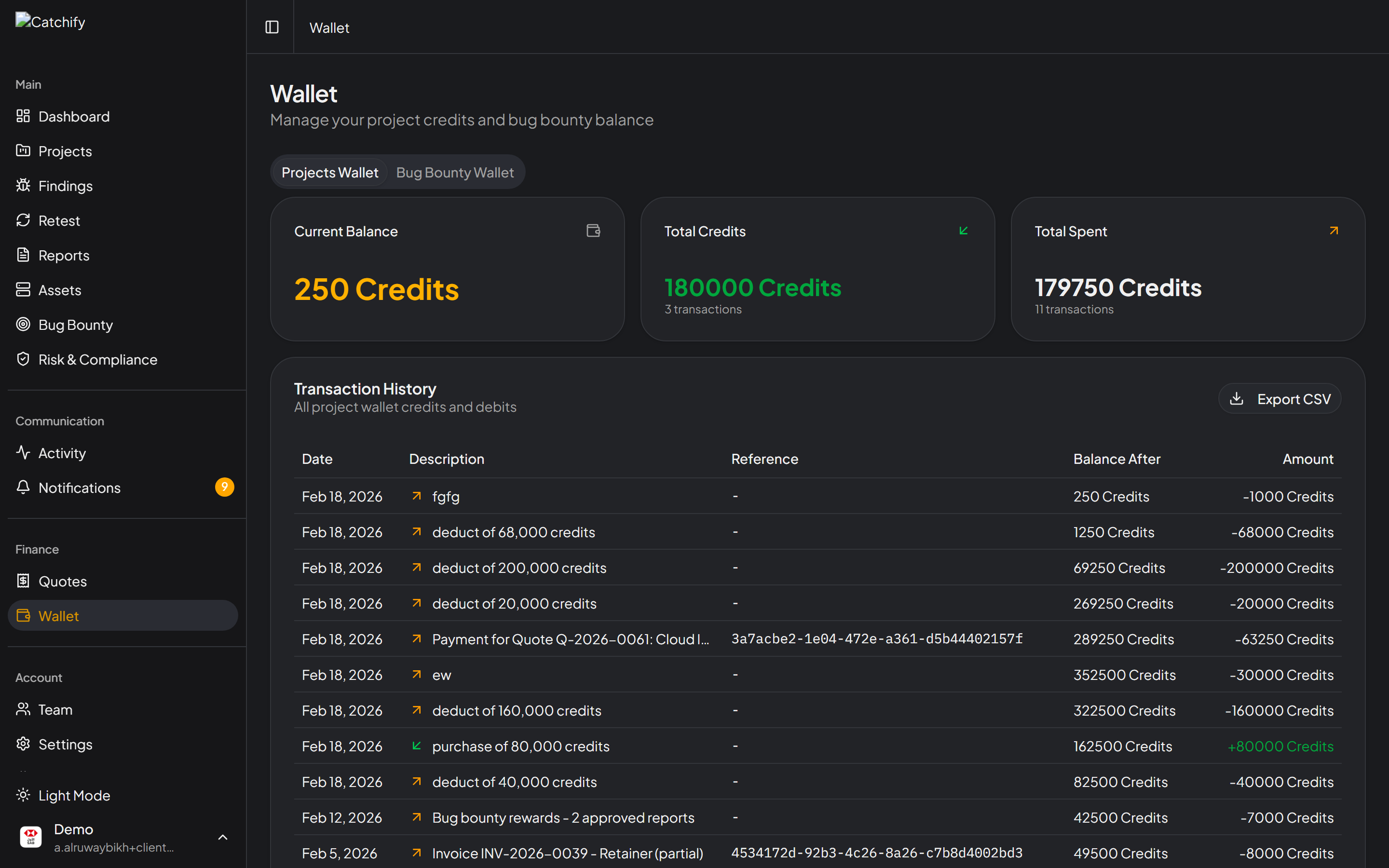
Your wallet balance and recent activity
## Viewing Your Wallet
Navigate to **Wallet** in the main menu to see:
| Section | What It Shows |
| ----------------------- | ----------------------------------------------------------------- |
| **Available Balance** | The amount currently available for rewards |
| **Pending Rewards** | Amounts reserved for approved reports awaiting payment processing |
| **Total Credits Added** | Cumulative amount deposited into your wallet |
| **Total Rewards Paid** | Cumulative amount paid out to researchers |
## Understanding Credits
Credits represent your prepaid balance for security services on the Catchify platform. Here is how the credit system works:
| Step | What Happens |
| ------------------------- | --------------------------------------------------------------------------------------- |
| **Catchify invoices you** | The Catchify team determines how much credit you need and sends an invoice |
| **You pay the invoice** | You process the payment as you would any vendor invoice |
| **Credits are added** | The Catchify team adds the corresponding credits to your account |
| **Credits are consumed** | Credits are used when bug bounty rewards are paid out or pentest services are delivered |
You can view your credit balance and full transaction history at any time in the portal. Every credit addition and deduction is recorded with a clear reference to the associated invoice or report.
Your credit balance and transaction details are always visible in the portal
{% hint style="info" %}
You do not add credits yourself. The process is always: Catchify invoices you, you pay, and the Catchify team adds credits to your account. This ensures accurate record-keeping and proper invoicing.
{% endhint %}
## Transaction History
The wallet page includes a complete history of every transaction, so you always know exactly where your budget is going:
* **Credits added** -- Deposits added by the Catchify team after you pay an invoice, with dates and invoice references
* **Rewards paid** -- Payments to researchers, linked to the specific bug bounty report
* **Running balance** -- Your balance after each transaction
Full transparency into every wallet transaction
You can filter the transaction history by:
* **Date range** -- View transactions for a specific period
* **Transaction type** -- Show only credits or only rewards
## What Consumes Credits?
Credits are deducted from your wallet when:
* **Bug bounty rewards are paid** -- When a report is approved and a reward is assigned, the amount is automatically deducted from your balance
* **Pentest services are delivered** -- Penetration testing engagements may also consume credits, depending on your agreement with Catchify
Each deduction is linked to the specific report or service it relates to, so you always have a clear audit trail.
## Budget Planning
To keep your bug bounty program running smoothly, we recommend:
* **Maintain a minimum balance** -- Keep enough in your wallet to cover at least a few weeks of expected rewards. Your account manager can help estimate this based on your program's activity level.
* **Respond to top-up invoices promptly** -- When the Catchify team sends a top-up invoice, processing it quickly ensures there are no gaps in your program's ability to pay researchers.
* **Review spending monthly** -- Check your transaction history to understand your average monthly reward spend and plan accordingly.
{% hint style="warning" %}
If your wallet balance reaches zero, approved reports cannot be paid until credits are added. The Catchify team monitors your balance and will proactively send you an invoice when it gets low, but prompt payment helps avoid any delays in rewarding researchers.
{% endhint %}
## Wallet vs. Invoices
It is helpful to understand the relationship between your wallet and your invoices:
* **Invoices fund your wallet** -- When the Catchify team sends you a credit invoice and you pay it, credits are added to your wallet
* **Bug bounty rewards** are paid from your wallet balance automatically
* **Your transaction history** shows every credit addition (with invoice reference) and every reward deduction (with report reference)
In short: Catchify invoices you, you pay, credits appear in your wallet, and rewards are deducted as reports are approved. The entire flow is managed for you.
{% hint style="success" %}
A well-funded wallet signals to researchers that your program is active and reliable, attracting higher-quality submissions and more consistent coverage.
{% endhint %}
## Questions About Your Wallet?
If you have questions about your wallet balance, need help planning your budget, or want to understand your spending patterns, contact your account manager or email .